Home Feedback Contents Navigator Utilities

Home
Download
Registration
Updates
Testimonials
About

Welcome to the home of Navigator Utilities: the essential navigation tool for all MS Excel power users.  Navigator Utilities is an add-in for MS Excel and has been tested with Excel 97, Excel 2000, Excel XP, Excel 2003 and Excel 2007 running on Windows.

Navigator Utilities will save you heaps of time and frustration in finding your way around and auditing large (and small) Excel workbooks.

>>>> DOWNLOAD NOW  

Softpedia guarantees that Navigator Utilities is 100% CLEAN, which means it does not contain any form of malware, including but not limited to: spyware, viruses, trojans and backdoors.
 

Simplify navigation through large spreadsheetsEasily navigate and audit your workbooks using the following Navigator tools:


bullet

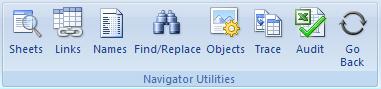
   Sheets - easily navigate through worksheets

bullet

   Links - for all those hard to find links

bullet

   Named Ranges - navigate through local/global and hidden names

bullet

   Enhanced Find/Replace

bullet

   Objects - easily find charts, drawings, comments, etc

bullet

   Trace - navigate through cell dependents and precedents

and even break Excel's Passwords to remove sheet protection and workbook structure protection!

Navigator Utilities is available for free download but registered users (once only registration fee) get some additional features and are notified by email of any updates.

Let us know what you think of Navigator Utilities. And tell your colleagues.

Any suggestions or feedback greatly appreciated.


Navigator Utilities

1)  Navigator Sheets                   Screenshot and details

Find your way through workbooks with many sheets.  Easily navigate hidden sheets.

Navigator Sheets lists all sheets showing those that are hidden, easily see which sheets are protected with passwords, and break passwords or protected sheets with a single click.

Easily delete, rename, hide, or protect several sheets at a time. Hide a sheet so that it cannot be made visible without VBA code. Replace all formulae in selected sheets with values with a single click.

2)  Navigator Links                      Screenshot and details

Ever had a workbook with a link that you cannot find? Excel wont tell you where it is!

Navigator Links lists all linked workbooks and lists all cells that use those links. Double-click to jump directly to the cell reference.

Navigator Links also finds links hidden in Named Ranges, or attached to objects such as buttons which may refer to a macro in a linked workbook. Easily jump directly to the found reference.

3)  Navigator Named Ranges       Screenshot and details

Named ranges can be confusing with local and global Names, and even hidden Names.  Navigator Names lists all Names and shows what they refer to with easy jumps to references and dependent cells.

Easily edit or add new Names, both local and global. Hide or unhide Names and clean out all those Names with invalid references with a single click.

4)  Navigator Enhanced Find/Replace
Screenshot and details        

Ever tried to find a string in a workbook and been frustrated with the limited functionality of MS Excel’s Find command. Navigator Find/Replace will find every cell which matched your search criteria in the whole workbook and displays them in a list enabling a quick jump to your target cell.

5)  Navigator Objects                    Screenshot and details

Easily find your way through all the objects in your workbook including: buttons, images, drawing objects, shapes, charts, checkboxes, comments, etc.  These objects an be hard to find, but not with Navigator Objects.  See all the charts in your workbook in a single list.  See all your comments in a single list.  And easily jump to the selected object.

6)  Navigator Trace                    Screenshot and details

Navigator Trace displays all Precedents and Dependents of a cell, allowing you to easily navigate through the related cells. Navigator Trace keeps track of where you have been as you audit your formulae allowing you to retrace your steps.


New Features:

  • v2.18 Now available
  • Easier Install
  • Faster Loading
  • New Object Navigator
  • New Trace Navigator

  • What others say:

    Read more ...

  • You have done a great job with Navigator Utilities and I'm delighted to be able to support your time and effort in return for a very useful addition to the arsenal of "stuff" that makes my daily working life that little bit easier.
        John Mitchell - Aust
  • It's not just useful, I don't think I could get through the day without it. Thanks for a great tool.
       Alan Bradshaw - UK
  • I think your add-in is superb. It really has helped me and is one of the few shareware products worth buying! 
       AJ Warner - USA
  • I have been using Navigator Utilities for just over a year now to manage multiple large Excel based applications.  The job would have been a nightmare without the features available in Navigator Utilities - I find it indispensable.
       Steve Quinn - USA
  • You have solved the horrible problem of invisible links and names in Excel! Although I learned to use Microsoft's tool for viewing and eliminating links, it was never satisfactory, and trying to work in the little Names box is time consuming at best.  Now that I have Navigator Utilities, all those problems have gone away!  Thank you!
       Patricia Jackson, USA
  • My wife can't understand how, after 15 years of playing with spreadsheets, I still get excited about something like an add-in! I do heavy-duty VBA programming in Excel on occasion, so I think I can recognize quality work when I see it. Navigator Utilities is a quality piece of work, Mark.
       Jim Williams, USA
  • Any one of these four could stand on their own as a solid utility.  Together, they represent an outstanding value and excellent tool for anyone working with large complex spreadsheets. The product is obviously the work of someone who has wrestled with complex spreadsheets.  I have found the Navigator Names, the Nav Find/Replace and the Navigator Link Multiple Link Update to be unique and particularly useful.  I look forward to the continued evolution of the product.
       Mike M., USA
  • Read more ...

    Why use Navigator Utilities

    All features in Navigator Utilities have been developed to solve problems arising from using MS Excel in a work environment. It does not contain lots of functions that you’ll never use. It only includes useful utilities that are used in everyday work.

    If you are an Excel power user, or even if you just use Excel every now and then, you will find Navigator Utilities an indispensable add-in to MS Excel.

    Contact Information

    For all support, queries, suggestions, help ...

    Contact: web1@robbo.com.au


                                   www.HannahRobinson.com.au

    [ Home ] Download ] Registration ] Updates ] Testimonials ] About ]

    Send mail to web1@robbo.com.au with questions or comments about this web site.
    Copyright © 2008 Robbo.com.au 
    Last modified: 24 Jun 2008